


Easy Line Remote
4.4784.00 Reviews
App Specs
- Version
- 7.5.1
- Updated On
- License
- Free
- Downloads
- 100,000+
- Developer
- Sonova AG
- Categories
- Medical
- Platform
- Android
Screenshots
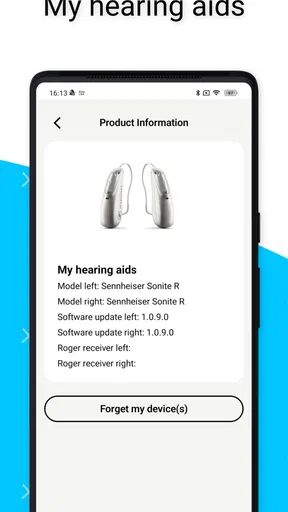
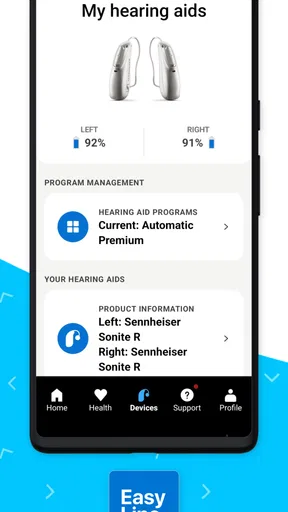
 Analysis by AppCompare
When hearing support becomes part of everyday life, the biggest challenge is often not the hearing device itself. It is the small moments around it: adjusting sound before a television program, checking whether a setting feels comfortable in a noisy kitchen, or helping someone without taking the device away from them. I found Easy Line Remote useful in precisely those situations. It is a medical app from Sonova AG that connects the hearing experience with a phone and adds health-related tracking in the same place.
My first impression was that it feels more practical than flashy. The app is free, aimed at everyone from an age-rating perspective, and its purpose is easy to understand: make compatible hearing support easier to manage during normal routines. It is not a replacement for professional hearing care, and it is not a general hearing test disguised as an app. Instead, it works best as a day-to-day control point for a person who already uses supported hearing equipment.
The most important thing to understand is that Easy Line Remote is a companion, not a universal hearing solution. Its usefulness depends on the hearing devices it is intended to work with and on the user’s willingness to keep a phone nearby. With that boundary in mind, I think it can make shared household situations calmer, more private, and less dependent on someone else guessing what the wearer needs.
How it fits into a shared household
A realistic example is a home where one person wears hearing devices and another person regularly helps with technology. Imagine preparing dinner while a television is playing in the next room. The wearer may want a different listening adjustment from the one that worked during a quiet morning. A partner or adult child might be close enough to help, but taking over the hearing devices or searching through unfamiliar menus can make the situation feel unnecessarily complicated.
Easy Line Remote gives the wearer a phone-based way to participate in that adjustment. In my view, that matters more than the novelty of controlling something from a mobile screen. Hearing preferences are personal, and the person wearing the devices should remain the main decision-maker. A helper can explain where to look or hold the phone during setup, but the final change should belong to the wearer whenever possible.
This shared-use scenario also reveals a practical trade-off. A household may have one phone that is always available, but that does not automatically make it a good permanent control device. If several people use the same phone, the app can become mixed with unrelated notifications, accounts, and settings. I would rather use a device that the wearer can reach easily and recognize immediately, even if a family member initially helps configure it.
The app is also more useful when the household agrees on a simple routine. For example, the wearer can try an adjustment first, describe what feels different, and then ask for help only if the result is confusing. That approach prevents the phone from becoming a remote control operated by someone else. It also gives the wearer a clearer sense of what each change does in real surroundings.
Worth Reading Before You Choose

EA SPORTS FC Mobile 26 Is a Bigger Football Game, but It Takes Time

Flipboard Shows What News Apps Must Do Beyond the Feed

Switching to Android Auto Means Rethinking Your Driving Routine

Google Calendar Makes a Crowded Week Easier to Manage

Ludo King Makes the Most of the Minutes Between Plans

Baby Panda World Brings Quick Play to Modern Phones, but Its Game Library Feels Busy
What I would do before handing over the phone
I would begin by installing the app on the phone that the wearer uses most often, rather than automatically choosing a relative’s phone. I would then complete the connection while sitting somewhere quiet, with the hearing devices ready and enough time to repeat a step if needed. Rushing through setup in a noisy room is a poor way to judge whether a connection or adjustment is working properly.
After that, I would test the app in more than one ordinary situation. A quiet room can show whether the basic controls are understandable, but it cannot tell you how comfortable the experience will be beside a television, in a conversation with several people, or while moving around the home. These tests are not scientific measurements; they are simply a way to discover which routine the wearer actually wants.
I would also make sure the wearer can identify the app without assistance. A large number of installed apps can make a medical companion harder to find, especially for someone who is not comfortable with smartphones. Keeping the app in a familiar location and avoiding unnecessary changes to the phone’s layout can be more helpful than explaining every option at once.
One useful habit is to change only one setting or listening preference at a time, then pause and listen. If several adjustments happen together, it becomes difficult to know which one helped and which one made things worse. This is a small but valuable discipline, particularly when a family member is assisting and wants to solve the problem quickly.
Where setup boundaries matter
Easy Line Remote should not be treated as a substitute for an audiologist, a hearing-device fitting, or medical advice. If the wearer experiences sudden changes in hearing, pain, dizziness, or a persistent problem that does not improve through ordinary device use, an app is not the right place to solve it. The phone can make interaction more convenient, but it cannot explain every physical or clinical issue.
There is another boundary that families sometimes overlook: helping with setup is not the same as having permission to manage someone’s hearing experience indefinitely. A relative may be more confident with technology, yet still misunderstand what the wearer is hearing. I prefer a setup where the helper teaches the basic path, writes down the routine in plain language if necessary, and then lets the wearer take control.
The app’s minimum operating-system requirement is Android or iOS version 10, so an older phone may need attention before installation. This is worth checking early in a shared household, especially when the plan is to reuse an unused family device. An old phone that cannot meet the requirement can create frustration before the hearing equipment is even connected.
I also would not assume that every phone in the home should be paired. Multiple phones may sound convenient, but they can make it unclear which device is currently being used for adjustments. A single primary phone is usually easier to understand. Add another device only when there is a clear reason and the wearer knows which one should be used first.
Coordination without taking control away
One of the strongest household uses I found is coordination. The person wearing the hearing devices can use the app as a shared reference point when explaining what feels comfortable, while a partner or caregiver can help remember a routine. The conversation becomes more specific: instead of saying “the sound is bad,” the wearer can describe when the problem occurs and what adjustment seemed useful.
That does not mean the app creates a family management system. I would not choose it expecting shared profiles, parental supervision, or a built-in way to assign responsibilities to relatives. Its value is more direct and personal. It helps the wearer interact with their own hearing setup, while household coordination happens through ordinary communication.
This distinction becomes important when several adults share a home. A partner might use the phone to help during an evening conversation, but that does not make the partner the owner of the hearing settings. An adult child visiting for the weekend can assist with a confusing screen, but should not assume that a change that works in one room will suit the wearer everywhere else.
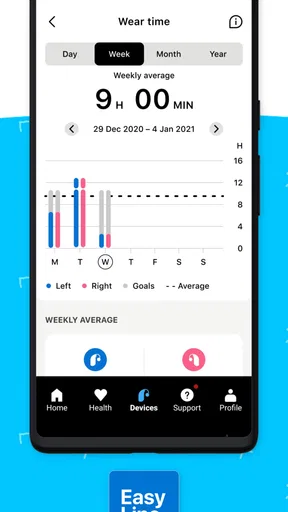
Health data tracking adds another layer to the conversation. I see it as potentially useful for noticing routines and discussing them with a hearing professional, rather than as something to monitor obsessively. A pattern can prompt a better question at an appointment, but it should not encourage the household to diagnose problems from a phone screen.
For caregivers, the best workflow is observational rather than controlling. Ask the wearer what they noticed, check whether the app reflects the same routine, and avoid making repeated changes on their behalf. This protects independence and reduces the chance that a well-meaning helper creates a setting the wearer cannot later reproduce alone.
A shared phone can still be helpful in a limited role. If the wearer has difficulty reading or navigating a small screen, a trusted person can hold the device while the wearer describes what they want. I would treat that as temporary assistance, not as a reason to move the entire account or daily routine onto somebody else’s phone.
Account boundaries and trust
Household technology works better when everyone knows whose information belongs to whom. Before using health-related tracking around other people, I would decide whether the phone is personal or shared and who can see its contents. The app may be used in a family setting, but the wearer’s health information should still be treated as private personal information.
This is especially important with children and teenagers in the home. A young person may be comfortable tapping through a phone, but that does not mean they should automatically manage an adult’s hearing settings or view health-related information. Help with a simple task is different from unrestricted access, and the boundary should be agreed on by the adults involved.
The same principle applies in reverse. If a child or teenager is the wearer, parents may need to help with setup and daily reminders, but the young person should still be included in decisions about comfort and listening situations. The app can support that conversation; it does not replace it with an automatic family-control structure.
I also recommend avoiding casual experimentation by guests. Someone who sees a hearing app on a phone may be curious, but changing settings as a joke or trying to “improve” the sound can be genuinely disruptive. A clear household rule—only the wearer or an agreed helper makes adjustments—protects trust and makes troubleshooting much easier.
Because Easy Line Remote is free, cost is not the main barrier to trying it. The more important questions are compatibility, phone access, and whether the wearer wants app-based control. A free app can still be the wrong choice if it makes the person feel watched, dependent, or pressured to track every aspect of hearing use.
Age context and everyday confidence
The everyone age rating makes the app suitable for a broad audience, but age suitability is not the same as technical comfort. An older adult may understand exactly what they want from hearing support while finding smartphone navigation tiring. In that case, the app should be introduced slowly, with a small number of repeatable actions rather than a long explanation of every possibility.
I would teach three things first: how to open the app, how to recognize the connected hearing setup, and how to return to the usual arrangement after trying a change. That last step is easy to overlook. A person feels much more confident experimenting when they know they can get back to a familiar starting point.
For a younger wearer, the advantage may be independence. Someone who moves between school, work, public transport, and home may appreciate being able to manage hearing preferences without announcing the need for assistance. The app can make the phone a discreet companion, although the user still needs to remember that phone battery, access, and device compatibility affect the experience.
For a person with memory difficulties, I would be more cautious. The app may be useful when a trusted helper is present, but too many options can create uncertainty. In that situation, a consistent routine and a clearly chosen primary phone are more valuable than encouraging frequent experimentation.
How it compares with the usual alternatives
The most obvious alternative is using the hearing devices without a companion app. That approach is simpler and avoids phone-related friction, which may be preferable for someone who wants the fewest possible steps. However, it can make everyday adjustments less visible and less convenient, especially when the wearer is already comfortable using a smartphone.
Another alternative is asking a family member to manage changes manually. That may work in a supportive household, but it places the wearer in a dependent role. Easy Line Remote is better when the goal is to let the person wearing the devices remain involved, while still allowing a helper to guide them during setup or an unusual situation.
Professional appointments remain the better option for fitting problems, persistent discomfort, or questions that go beyond daily control. The app can help organize observations and make routine use easier, but a hearing professional has the expertise to evaluate issues that a phone interface cannot resolve.
Compared with a general health-tracking app, this one is more closely tied to the hearing experience rather than broad wellness logging. That focus is a strength for the intended user, but it also means it will not replace a wider health platform. I would choose it for hearing-device interaction and related tracking, not as an all-purpose medical dashboard.
What changed in the current experience
The app was released on July 11, 2019, and the current version is 7.5.1. Those details matter mainly because a mature companion app can be easier to fit into an established routine than a brand-new tool, while updates can also change the location or presentation of controls. I would not rely on an old family tutorial without checking the current screens after an update.
Its reach is meaningful without being universal: the app has more than one hundred thousand installs, an average rating of 4.3 from around five thousand ratings, and 783 written reviews. I read that as evidence of a generally positive reception, not as a guarantee that every hearing setup or household will feel equally smooth. Compatibility and personal preference still matter more than popularity.
The practical lesson is to judge it during the first week of real use rather than after a single successful connection. Try the app at home, during conversation, and when another person is helping. Notice whether the wearer can repeat the main actions independently. If the app improves confidence and reduces unnecessary handoffs, it is doing its job; if it creates more confusion than control, the simpler alternative may be better.
Who should use it, and who should skip it
I would recommend Easy Line Remote to a hearing-device wearer who already uses a compatible setup and wants phone-based access to everyday adjustments and health-related tracking. It is particularly suitable for households where a partner or caregiver helps occasionally but the wearer should remain in charge. The app’s free price also makes a trial easier when the main concern is practical usefulness rather than an additional subscription.
I would be less enthusiastic for someone who dislikes smartphones, cannot keep a phone available, or prefers to operate hearing devices directly. In that case, the app may add a layer of technology without solving a real problem. I would also skip it as a response to a new or worrying medical symptom; that calls for appropriate professional attention instead.
Families should avoid treating it as a surveillance tool. Tracking can support a conversation, but it should not become a daily test that the wearer has to justify. The strongest household experience is collaborative: the wearer decides what feels right, helpers support the process, and everyone respects the privacy of the information involved.
My household verdict
After using Easy Line Remote as a companion for everyday hearing management, I see its main strength in the space between independence and assistance. It can help a wearer make personal adjustments without waiting for someone else, while still giving a household a sensible way to cooperate when technology becomes confusing.
It is not perfect for every shared-device arrangement. A communal phone can blur account boundaries, an older phone may not meet the operating-system requirement, and helpers can easily become too involved. Those are not reasons to reject the app, but they are reasons to establish a clear primary user and a simple support routine before relying on it.
For me, the deciding question is not whether the app offers more controls than direct use. It is whether it makes the wearer feel more capable in the situations that actually matter: conversations, television, household noise, and appointments where useful observations can be discussed. When the answer is yes, Easy Line Remote is a thoughtful and practical addition to a supported hearing setup.
Sonova AG has positioned this free medical companion for ordinary use rather than dramatic transformation, and that is exactly how I would approach it. Install it on the wearer’s main phone, set it up calmly, agree on who may help, and judge it by the confidence it creates. For a household that respects those boundaries, Easy Line Remote can make hearing support feel less like a shared technical problem and more like a manageable part of daily life.
Pros
- Simple remote controls make TV operation easy for all ages.
- Supports convenient channel
- volume
- and power adjustments.
- Useful backup when the physical remote is lost or damaged.
- Lightweight interface is quick to understand and navigate.
- Can reduce the need for multiple replacement remotes at home.
Cons
- Requires a compatible TV and device configuration to work properly.
- Some features may depend on infrared or the same Wi-Fi network.
- May not support every TV brand or model.
- Phone calls and notifications can interrupt remote-control use.
- Using the phone as a remote can drain its battery over time.
FAQs for Easy Line Remote
What is Easy Line Remote, and what does it do?
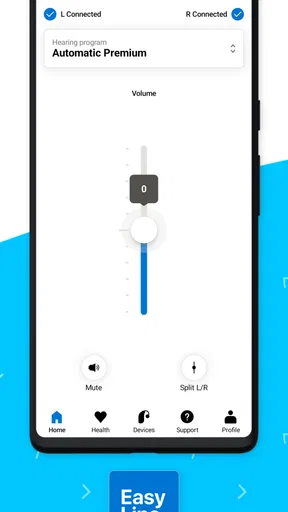
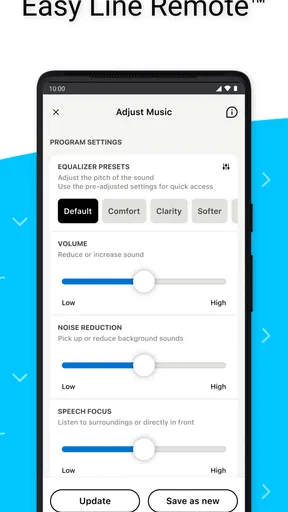
Easy Line Remote is a companion app designed for users of compatible hearing aids. After pairing, it lets you adjust listening volume, change programs, mute the hearing aids, and access other supported controls from an Android or iPhone. It is intended to make everyday adjustments more convenient, especially in situations such as restaurants, conversations, travel, or watching television, without needing to handle the hearing aids directly.
Which hearing aids and phones are compatible with Easy Line Remote?
Compatibility depends on the specific Easy Line hearing aid model, phone operating system, Bluetooth support, and the app version installed. Before downloading, check the compatibility information provided by the developer or your hearing-care professional. Some features may work differently on Android and iOS, and certain older phones or hearing aids may not support direct connection, remote control, or every available function.
How do I connect my hearing aids to Easy Line Remote?
To begin, install Easy Line Remote, enable Bluetooth on your phone, and follow the in-app pairing instructions. In many cases, the hearing aids must be restarted or placed into pairing mode before they appear in the app. It is important to grant the requested permissions and keep the devices close together. If pairing fails, restarting both the phone and hearing aids usually helps.
Can Easy Line Remote replace a hearing-care professional or hearing-aid fitting?
No. Easy Line Remote is a control and convenience tool, not a replacement for professional hearing care. It may allow you to make limited adjustments, but it does not independently diagnose hearing problems, perform a complete fitting, or correct technical issues. If the sound remains uncomfortable, speech is unclear, or the hearing aids behave unexpectedly, contact an audiologist or authorized hearing-care provider.
Does Easy Line Remote work without an internet connection, and is it free to use?
The app is generally used locally with compatible hearing aids through Bluetooth, so basic remote-control functions may work without continuous internet access after setup. However, internet access can be required for downloading the app, updates, account-related services, or optional features. Easy Line Remote is typically available as a free download, although compatible hearing aids and professional services are separate products and may involve additional costs.


